If you run a WordPress website, you already have one of the most SEO-friendly platforms on the market. But having WordPress installed is just the beginning. To actually rank on Google and drive real organic traffic, you need to follow WordPress SEO best practices that go beyond the defaults. Whether you’re a business owner, marketer, or developer, this guide covers everything you need to know to get your site performing at its best.
WordPress now powers 42.8% of all websites in 2026, so small improvements to how you build and maintain your site can mean a big difference in visibility, traffic, and leads for your business.
At Hako IT, we build and optimize WordPress websites for businesses every day. We’ve seen firsthand what separates a site that ranks on page one from one that gets buried. Let’s break it all down.
Key Takeaways
| Question | Short Answer | Where To Learn More |
|---|---|---|
| 1. What are the most important WordPress SEO best practices for 2026? | Focus on fast loading times, clear site structure, high quality content, and mobile friendly design that respects Core Web Vitals. | Our web development approach |
| 2. How technical do I need to be to improve WordPress visibility? | You can get strong results by combining a good theme, a few reliable plugins, and clear content guidelines, and asking a partner like us for the complex parts. | Web development services |
| 3. What is the first step for a new WordPress site in 2026? | Start with a clean, lightweight theme, a logical page structure, and a simple content plan for your main services and articles. | Our step‑by‑step teaching style |
| 4. How important is performance for WordPress in 2026? | Very important, because slow sites lose visitors quickly and usually appear less often for new visitors looking for your services. | See how we think about performance |
| 5. Do structured data and clear metadata still matter? | Yes, clear titles, descriptions, headings, and schema markup help people and crawlers understand your content faster. | Data clarity mindset |
| 6. How does analytics help with WordPress in 2026? | Analytics shows which pages convert, which are slow, and what users search for, so you can focus your improvements. | Our analytics and reporting services |
| 7. Can I get support to implement these best practices? | Yes, we can review your site, propose a practical roadmap, and handle the technical implementation while you focus on your business. | How we guide digital projects |
What Is WordPress SEO and Why Does It Matter?
SEO (Search Engine Optimization) is the practice of improving your website so search engines like Google can find it, understand it, and rank it for relevant searches. WordPress SEO specifically refers to the techniques and settings you apply within the WordPress ecosystem to achieve that.
Why does it matter? Because over 90% of online experiences start with a search engine. If your website isn’t optimized, potential customers simply won’t find you — no matter how great your product or service is. Good SEO brings consistent, free, high-intent traffic to your site month after month.
The good news? WordPress makes it easier than most platforms. With the right plugins, settings, and habits, you can build a well-optimized site without being a technical expert.
1. Choose a Fast, SEO-Friendly WordPress Theme
Your theme is the foundation of your site. A bloated, poorly coded theme will slow your site down and hurt your rankings before you’ve even written a word of content. Google uses page speed as a direct ranking factor, so this matters a lot.
When choosing a theme, look for:
- Lightweight code — minimal unnecessary scripts and styles
- Mobile responsiveness — it must look and work perfectly on phones
- Semantic HTML structure — proper use of heading tags (H1, H2, H3)
- Schema markup support — helps search engines understand your content
Popular SEO-friendly options include themes paired with visual builders like Divi, which gives you full design control without sacrificing performance — especially when combined with proper image optimization and a caching plugin. The key is always to configure your setup correctly: a well-tuned Divi site can score excellent results on Google PageSpeed Insights and Core Web Vitals.
2. Install a Reliable SEO Plugin
One of the biggest advantages of WordPress is the plugin ecosystem. An SEO plugin handles a huge amount of the technical optimization for you. The two most popular options are Yoast SEO and Rank Math.
Both plugins allow you to:
- Set custom meta titles and descriptions for every page and post
- Generate XML sitemaps automatically
- Control which pages search engines index
- Add structured data (schema markup)
- Analyze keyword usage and readability in real time
Rank Math has become very popular because it offers more features for free. Either way, pick one and stick with it. Don’t install both — they can conflict with each other.
3. Configure Your WordPress Permalink Structure
By default, WordPress uses ugly URLs like yoursite.com/?p=123. This is terrible for SEO. You want clean, descriptive URLs that include your target keyword.
Go to Settings → Permalinks and choose the “Post name” option. This creates URLs like yoursite.com/wordpress-seo-best-practices — clear, readable, and keyword-rich.
A few rules for good URLs:
- Keep them short and descriptive (3–5 words is ideal)
- Use hyphens between words, not underscores
- Include your primary keyword
- Avoid stop words like “the,” “a,” and “of” when possible
If you change permalinks on an existing site, always set up 301 redirects from the old URLs to the new ones to preserve your SEO equity.

4. Optimize Your Title Tags, Meta Descriptions and Slugs
Your title tag is one of the most important on-page SEO elements. It’s what appears as the clickable headline in Google search results. Your meta description is the short summary below it. Use meta descriptions to preview the value of the page and invite clicks, not to stuff extra words..
Write unique titles that include your main phrase plus a benefit, like “WordPress SEO Best Practices for 2026: Faster Sites, More Traffic”. Keep them under 60 characters where possible.
For title tags:
- Keep them between 50–60 characters
- Include your primary keyword near the beginning
- Make them compelling — you’re competing for clicks
For meta descriptions:
- Aim for 150–160 characters
- Include your keyword naturally
- Add a clear call to action (e.g., “Learn more,” “Get started,” “Discover how”)
Your SEO plugin (Yoast or Rank Math) makes this easy — there’s a dedicated field for both on every page and post editor.
Slugs should be short, readable, and avoid stop words when they do not add clarity.
5. Do Proper Keyword Research Before Writing
Great content starts with understanding what your audience is actually searching for. Keyword research helps you find the exact phrases people type into Google so you can write content that matches their intent.
Free and paid tools for keyword research include:
- Google Keyword Planner — free, great for search volume data
- Ubersuggest — good free tier for smaller sites
- Ahrefs / SEMrush — industry-standard paid tools with deep data
- Google Search Console — shows you what terms your site already ranks for
For each piece of content, identify one primary keyword and 3–5 secondary/related keywords. Use them naturally throughout your headings, body text, and image alt text. Never stuff keywords — write for humans first.
6. Create High-Quality, In-Depth Content
Google’s algorithm has become remarkably good at recognizing genuinely helpful content. Thin, surface-level posts won’t rank anymore. To follow WordPress SEO best practices on content, you need to go deep.
What makes content rank?
- Depth and completeness — cover the topic thoroughly
- Originality — bring a unique perspective or insight
- Readability — short sentences, clear paragraphs, logical structure
- E-E-A-T — demonstrate Experience, Expertise, Authority, and Trustworthiness
- Updated information — keep your content current
Aim for content that answers questions better than anything else on page one. If a competitor has a 1,200-word post and yours goes 2,500 words with better examples and visuals, Google tends to prefer yours over time.
7. Use Heading Tags Properly (H1, H2, H3)
Heading tags help both readers and search engines understand the structure of your content. Each page should have exactly one H1 — your main title. Everything below that should use H2 for main sections, and H3 for subsections within those.
Never skip levels (like jumping from H2 to H4). This confuses both users and crawlers.
Include your primary keyword in at least one or two H2 headings. Use natural variations throughout — don’t repeat the exact same phrase robotically in every heading.
8. Optimize Images for SEO
Images are often the single biggest contributor to slow page load times — and slow pages rank lower. Here’s how to optimize every image you upload:
- Compress before uploading — use tools like Squoosh, TinyPNG, or a plugin like ShortPixel
- Use modern formats — WebP files are significantly smaller than JPG/PNG
- Write descriptive file names —
wordpress-seo-tips.webpbeatsIMG_0042.jpg - Fill in alt text — describe the image for screen readers and search engines; include keywords naturally
- Set image dimensions — prevents layout shifts that hurt Core Web Vitals scores
A fast-loading, well-labeled image library makes a real difference in both rankings and user experience.
9. Build a Strong Internal Linking Structure
Internal links connect your pages to each other. They serve two critical purposes: they help visitors navigate your site, and they distribute “link equity” (ranking power) throughout your content.
Best practices for internal linking:
- Link to relevant posts and pages within your body content
- Use descriptive anchor text (not “click here” — use the target keyword instead)
- Include 3–5 internal links per post for standard articles
- Link your newest content to your highest-authority older pages
- Create “pillar” pages (comprehensive guides) and link cluster content to them
Good internal linking tells Google which pages are most important on your site and helps it crawl your content more effectively.
10. Improve Your Site Speed and Core Web Vitals
Google officially uses Core Web Vitals as a ranking signal. These are three metrics that measure user experience:
- LCP (Largest Contentful Paint) — how fast the main content loads (aim for under 2.5 seconds)
- INP (Interaction to Next Paint) — how responsive the page is to user input
- CLS (Cumulative Layout Shift) — how stable the layout is as the page loads
To improve these on WordPress:
- Use a caching plugin (WP Rocket, W3 Total Cache, or LiteSpeed Cache)
- Enable a Content Delivery Network (CDN) like Cloudflare
- Minimize and defer JavaScript and CSS files
- Use quality hosting — a slow server undermines everything else
Test your site regularly using Google PageSpeed Insights to spot issues before they hurt your rankings.
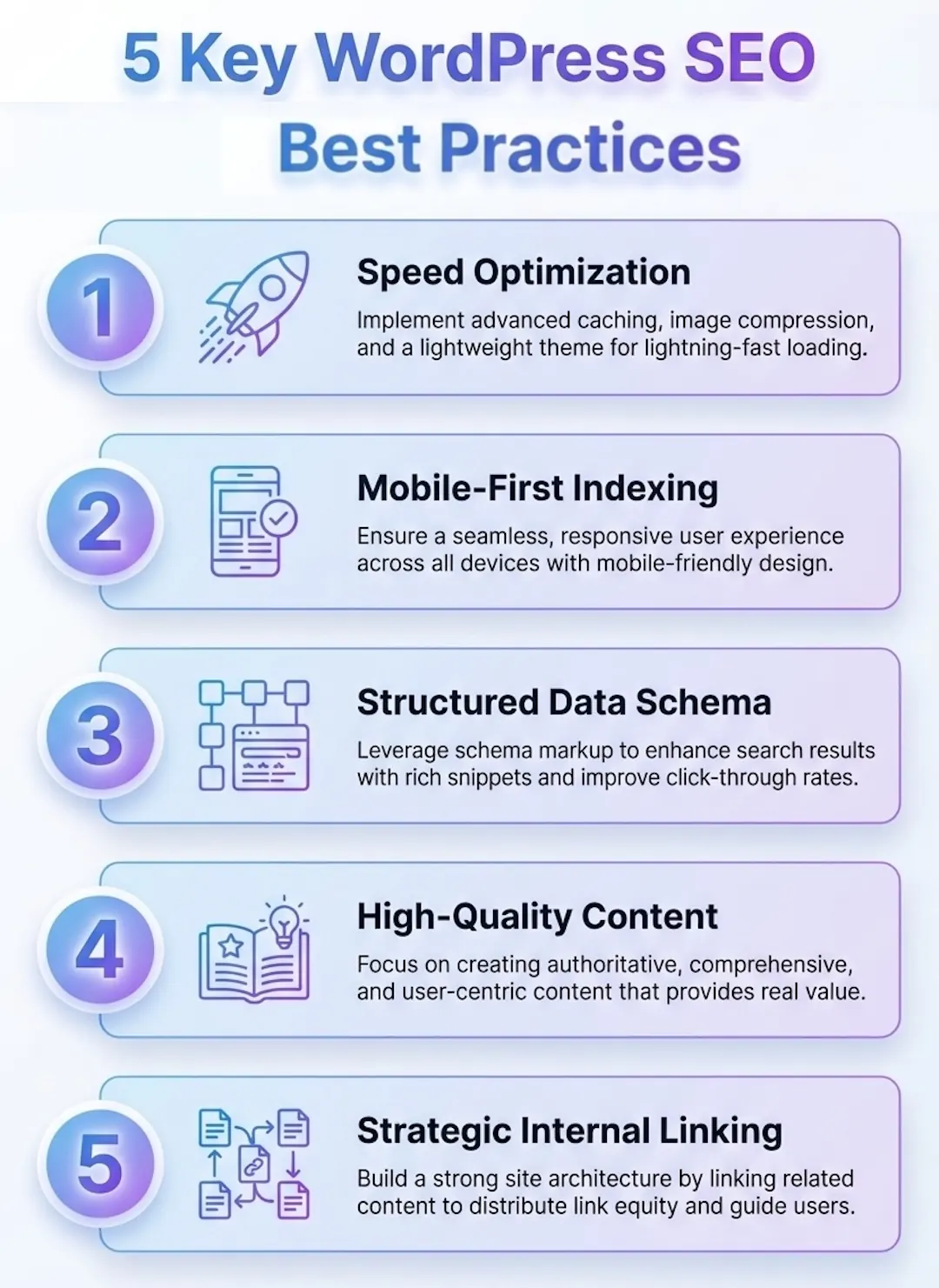
A quick visual guide to the top WordPress SEO practices for 2026. Learn how to optimize content, site structure, and performance.
11. Make Your Site Mobile-Friendly
Google now uses mobile-first indexing — meaning it primarily uses the mobile version of your site to determine rankings. If your site breaks or underperforms on a phone, your rankings will suffer even for desktop searches.
Check your mobile experience by:
- Using Google’s Mobile-Friendly Test tool
- Testing on real devices (not just browser simulation)
- Making sure buttons are large enough to tap comfortably
- Ensuring text is readable without zooming
- Avoiding intrusive pop-ups that cover the content on mobile
Most modern WordPress themes are responsive out of the box, but always verify — especially after adding new plugins or page builder elements.
12. Set Up and Submit an XML Sitemap
An XML sitemap is a file that lists all the important pages on your site. It helps Google crawl and index your content faster. Your SEO plugin (Yoast or Rank Math) generates this automatically.
After setting it up, submit your sitemap to Google Search Console at yoursite.com/sitemap.xml. This tells Google exactly where to find your content and how often it updates.
Make sure your sitemap only includes pages you want indexed — exclude low-value pages like tag archives, author pages, and duplicate content.
13. Use HTTPS / SSL Certificate
If your site still runs on HTTP, fix this immediately. Google flagged non-HTTPS sites as “Not Secure” years ago, which damages visitor trust and hurts rankings. HTTPS is a confirmed (though small) ranking factor.
Most quality hosting providers include free SSL certificates through Let’s Encrypt. Activate it in your hosting dashboard, then use a plugin like Really Simple SSL to redirect all HTTP traffic to HTTPS in WordPress.
This is a one-time setup that pays ongoing dividends in both security and SEO.
14. Earn Backlinks from Authoritative Sites
Backlinks — links from other websites pointing to yours — remain one of the strongest ranking signals in Google’s algorithm. One high-quality backlink from a reputable industry site can do more for your rankings than dozens of low-quality links.
Practical ways to earn backlinks:
- Create link-worthy content — original research, comprehensive guides, and free tools attract natural links
- Guest posting — write valuable articles for industry blogs in exchange for a link
- Digital PR — share data, insights, or stories that journalists and bloggers want to reference
- Fix broken links — find broken links on relevant sites and offer your content as a replacement
- Partner content — collaborate with complementary businesses for mutual mentions
Avoid buying links or participating in link schemes — Google penalizes these aggressively and the risk far outweighs any short-term gain.
15. Monitor Your SEO Performance Consistently
SEO is not a set-it-and-forget-it strategy. You need to track what’s working, spot problems early, and adjust your approach over time. The good news is that the best tools for this are free.
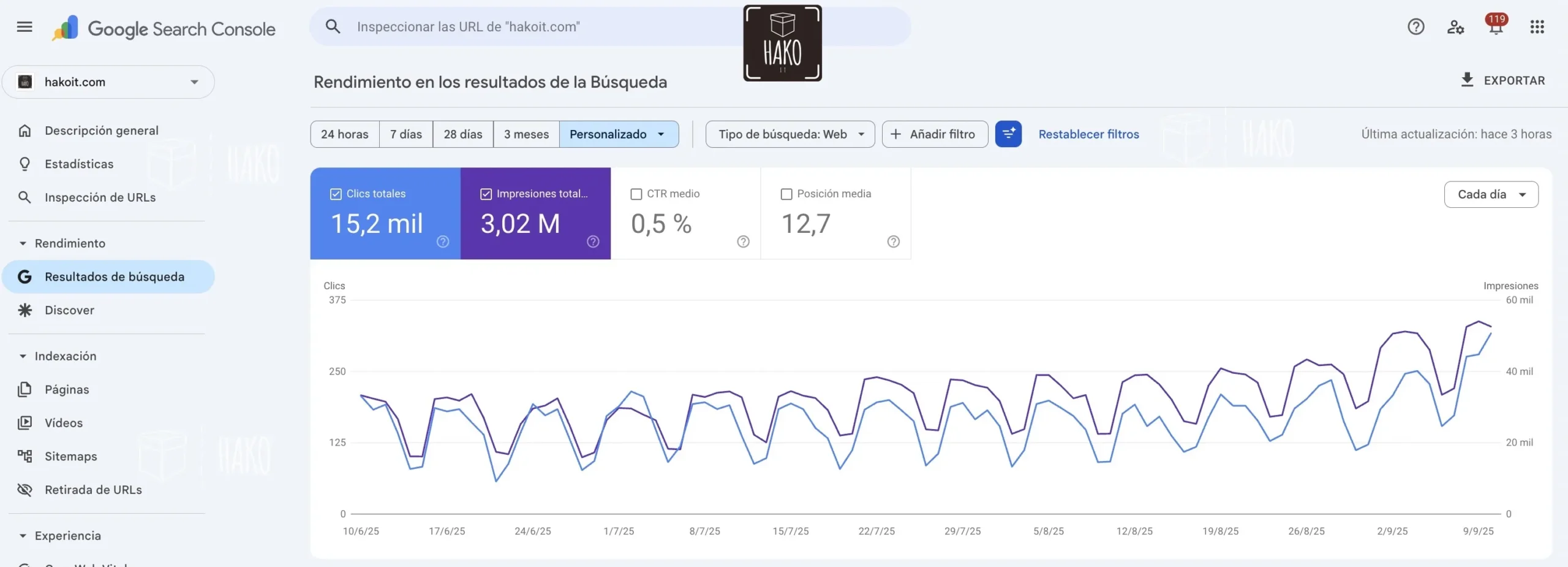
Google Search Console shows you:
- Which queries your site appears for (and your average position)
- Which pages get the most clicks
- Index coverage issues and crawl errors
- Core Web Vitals performance
Google Analytics 4 shows you:
- How much organic traffic you’re getting
- Which pages visitors land on and where they go next
- Conversion data — are SEO visitors actually taking action?
Set a monthly review cadence. Look at your top-performing pages and find opportunities to refresh content, improve underperforming pages, and build more internal links to content that’s close to ranking on page one.
🚀 Need a professionally built WordPress site optimized for SEO from day one?
At Hako IT, we design and develop WordPress websites that are fast, secure, and built to rank. Explore our web development services →
WordPress SEO Best Practices: On-Page Checklist
Before you publish any page or post, run through this quick checklist to make sure you’ve covered the key on-page SEO elements:
| Element | What to Check |
|---|---|
| Title Tag | 50–60 characters, includes primary keyword |
| Meta Description | 150–160 characters, includes keyword + CTA |
| URL Slug | Short, includes keyword, uses hyphens |
| H1 Tag | One per page, includes keyword |
| H2/H3 Tags | Logical structure, keyword variations included |
| First 100 Words | Primary keyword appears naturally |
| Images | Compressed, WebP format, descriptive alt text |
| Internal Links | 3–5 links with descriptive anchor text |
| External Links | 2–3 links to authoritative sources |
| Keyword Density | Around 1–1.5%, no stuffing |
Advanced WordPress SEO: Going Beyond the Basics
Once you’ve got the fundamentals in place, there are several more advanced strategies worth implementing:
Schema Markup / Structured Data
Schema markup is code that tells Google extra details about your content — like that a post is a recipe, an FAQ, a product, or a how-to guide. This can unlock rich results (star ratings, FAQ dropdowns, breadcrumbs) in search results that dramatically increase click-through rates. Rank Math and Yoast both offer schema tools, or you can implement it manually via JSON-LD.
Featured Snippet Optimization
Featured snippets are the answer boxes that appear at position zero in Google results. To target them, structure your content so it directly answers common questions. Use a question as an H2 heading, then answer it concisely in 40–60 words immediately below. Lists and tables also frequently get pulled into featured snippets.
Content Clusters and Pillar Pages
A content cluster strategy involves creating one comprehensive “pillar” page on a broad topic, then writing multiple supporting articles on related subtopics that all link back to the pillar. This signals to Google that your site is an authority on the topic as a whole, boosting rankings for all pages in the cluster.
Local SEO for WordPress
If you serve local customers, local SEO is essential. Set up a Google Business Profile, optimize your site with location-specific keywords, and ensure your NAP (Name, Address, Phone) information is consistent across your site and all online directories. Plugins like Rank Math include local SEO schema to help with this.
🎯 Ready to take your WordPress SEO to the next level?
Hako IT specializes in building and optimizing WordPress websites for businesses that want to grow online. From technical SEO audits to full website development, we’ve got you covered.
Optimize Images, Fonts, And Media For Faster WordPress Pages
Images are usually the heaviest elements on a WordPress page, often around 900 KB or more on mobile. Reducing that weight is one of the fastest wins for better performance and user experience.
We encourage clients to think “mobile first” when they choose image sizes and formats. Large hero images look nice, but not if they slow down the first screen for everyone.
Use Modern Formats And Responsive Sizes
Prefer WebP or AVIF formats for most images where your theme and hosting support them. These formats keep quality high while reducing file size significantly.
Always upload images at the exact or slightly larger size than the largest display container. Avoid uploading 4000 px wide images when the content area is only 1200 px wide.
Lazy Load And Defer Non Critical Media
Enable lazy loading for images and iframes so they only load when users scroll near them. In 2026, most modern themes support this natively or through performance plugins.
For background videos or heavy embeds, consider static thumbnails with a play button. This keeps the first paint light while still offering rich media for engaged visitors.

Secure Your WordPress Site And Build Trust
Security and trust are deeply connected with visibility in 2026. A compromised or flagged site can quickly disappear from discovery flows and lose user confidence.
We always combine technical hardening with visible trust elements, so visitors feel safe sharing data or buying from you.
Basic Security Practices For Every WordPress Site
Use SSL across the whole site, not just the checkout or login. Strong passwords, two factor authentication, and limited admin accounts are simple but powerful steps.
Install a reputable security plugin, keep themes and plugins updated, and remove anything you no longer use. Old code is one of the most common risks.
Show Trust Signals On Key Pages
Add clear contact information, privacy policies, and refund terms where relevant. For forms and checkout pages, show badges or short messages about how you protect user data.
Testimonials, case studies, and portfolio items also help visitors feel more comfortable engaging with your brand.

Compare Key WordPress SEO Practices For 2026
Let us put the main WordPress SEO best practices for 2026 into a practical comparison table. This helps you decide what to prioritize first based on effort and impact.
We usually start with low effort, high impact items so you see quick wins while we plan deeper projects like redesigns or content hubs.
Comparison Table: WordPress Best Practices By Impact And Effort
| Practice | Main Goal | Impact On Traffic | Implementation Effort | Typical Tools / Methods |
|---|---|---|---|---|
| Performance Optimization | Improve loading times and Core Web Vitals | Very High | Medium to High | Fast hosting, caching plugin, image optimization |
| On Page Content Updates | Increase relevance and engagement | High | Medium | Content refreshes, better headings, FAQs |
| Internal Linking & Structure | Help users and crawlers discover key pages | High | Low to Medium | Navigation cleanup, contextual links |
| Technical Cleanup | Reduce errors and crawl issues | Medium to High | Medium | Fix redirects, canonical tags, sitemaps |
| Structured Data | Enhance search snippets and clarity | Medium | Low to Medium | Schema plugin, manual JSON‑LD for key pages |
| Security Hardening | Protect visibility and user trust | High (risk reduction) | Low to Medium | Security plugin, updates, strong access policies |
| Analytics & Conversion Tracking | Measure which pages and actions matter | Indirect but High | Medium | GA4, tag manager, custom events |
Measure Results With Analytics And Dashboards
Without measurement, it is hard to know which WordPress SEO best practices for 2026 are working for your business. We like to keep analytics simple but actionable.
Focus on a short dashboard that tracks organic sessions, key page load times, conversion rates, and the pages that bring the most leads or revenue.
Use GA4, Search Data, And Heatmaps
Configure GA4 events for form submissions, contact clicks, and purchases. This helps you tie content changes to real business outcomes.
Heatmaps and scroll maps are useful to see if users actually reach important sections, or if layout changes are needed to surface key information earlier.
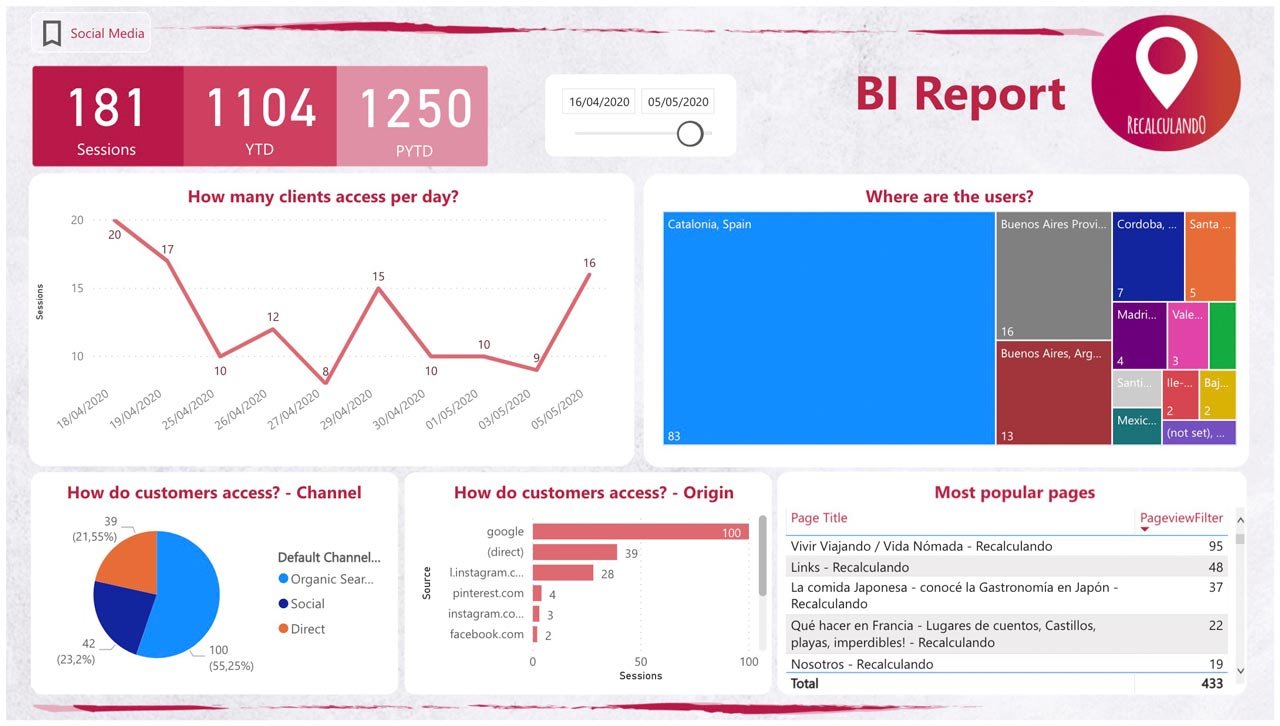
Build BI Style Dashboards For Clarity
For larger sites, consider using a tool like Power BI to create higher level dashboards that combine analytics, sales, and support data. This is the kind of work we do regularly for clients.
➜ Power BI Dashboard Analytics example
Clear visualizations help non technical teams understand which content investments truly support the business.
Plan A Simple 90 Day Roadmap For Your WordPress Site
Knowing everything you could do is helpful, but what really works is a short, realistic roadmap. We like to work in 90 day cycles for WordPress improvement projects.
This gives enough time to implement technical changes, publish content, and start seeing measurable effects without overwhelming your team.
Example 90 Day Roadmap
- Weeks 1 to 3: Technical audit, hosting review, caching setup, image optimization baseline.
- Weeks 4 to 6: Navigation cleanup, internal linking updates, structured data for main pages.
- Weeks 7 to 9: Content refresh for top 5 pages, publish 3 to 5 new high intent articles.
- Weeks 10 to 12: Analytics dashboard setup, conversion tracking, review results and next steps.
With this type of plan, you always know what comes next. You can also pause or adjust between cycles based on capacity and results.
Key Takeaways Table: WordPress SEO Best Practices For 2026
To close, here is a compact table of the most important WordPress SEO best practices for 2026. You can use it as a checklist when reviewing your site.
We recommend saving this list, then scheduling a short review every quarter to keep your site healthy and aligned with your business goals.
| Area | Key Action | Why It Matters in 2026 | How Often To Review |
|---|---|---|---|
| Hosting & Theme | Use fast hosting and a lightweight theme | Improves speed and stability for all visitors | Annually, or before big redesigns |
| Site Structure | Organize content into clear categories and hubs | Makes it easier for users to navigate and find answers | Every 6 to 12 months |
| Performance | Optimize Core Web Vitals and reduce page weight | Directly affects user satisfaction and visibility | Quarterly, with each major update |
| On Page Content | Refresh titles, headings, and body text | Keeps content aligned with real user questions | Quarterly for key pages |
| Structured Data | Add and maintain schema for important pages | Improves how your pages appear and are understood | Every 6 months or when templates change |
| Security | Keep WordPress, themes, and plugins updated | Prevents issues that can reduce visibility overnight | Monthly, or with auto updates |
| Analytics | Track traffic, conversions, and page performance | Shows which actions bring real business results | Monthly review, quarterly deep dive |
Frequently Asked Questions About WordPress SEO Best Practices
What is the most important WordPress SEO best practice to start with?
If you’re just getting started, the single most impactful step is installing an SEO plugin like Rank Math or Yoast SEO and configuring your permalink structure to use post names. These two changes immediately improve how Google reads and indexes your site, and set you up to optimize every piece of content you publish going forward.
Does the WordPress theme I choose affect my SEO?
Yes, significantly. A poorly coded or misconfigured theme can slow your site down, use incorrect heading structures, and generate messy HTML — all of which hurt your rankings. That said, a well-configured theme with a visual builder like Divi can perform excellently for SEO when paired with the right optimizations (image compression, caching, and a good SEO plugin). The theme itself is less important than how it’s set up and maintained.
How long does it take to see results from WordPress SEO?
SEO is a long-term strategy. In most cases, you’ll start seeing meaningful movement in rankings and traffic after 3–6 months of consistent effort. Newer sites or more competitive niches may take longer. That said, some technical fixes (like improving page speed or fixing crawl errors) can show results within weeks.
Do I need to know how to code to do WordPress SEO?
No. The vast majority of WordPress SEO best practices can be implemented without any coding knowledge, thanks to plugins like Rank Math, WP Rocket, and ShortPixel. However, a basic understanding of HTML and how websites work will help you implement more advanced optimizations like schema markup or custom redirect rules.
What’s the difference between on-page SEO and technical SEO in WordPress?
On-page SEO refers to optimizations you make within your content — keyword placement, title tags, headings, meta descriptions, and internal linking. Technical SEO refers to the behind-the-scenes factors that affect how search engines crawl and index your site — things like site speed, HTTPS, XML sitemaps, mobile responsiveness, and Core Web Vitals. Both are essential for strong rankings.
How often should I update my WordPress content for SEO?
As a general rule, review your most important pages at least once a year. If a post contains statistics, product information, or process instructions that change over time, update it sooner. Google favors fresh, accurate content — and updating an existing high-performing page is often faster and more effective than writing a brand new one.
Is WordPress good for SEO compared to other platforms?
WordPress is widely considered one of the best platforms for SEO. Its flexible architecture, massive plugin ecosystem (especially Yoast and Rank Math), clean URL structure, and active developer community make it easier to implement SEO best practices than most closed platforms. Major brands and media companies use WordPress precisely because of this flexibility.
Conclusion
Mastering WordPress SEO best practices is one of the smartest investments you can make in your online presence. From choosing the right theme and configuring your permalinks, to creating great content, optimizing images, building backlinks, and monitoring performance — every step compounds over time.
The sites that dominate search in 2026 won’t be the ones that tried one or two tricks. They’ll be the ones that consistently applied solid fundamentals, created genuinely helpful content, and kept improving. Start with the checklist in this guide, implement one area at a time, and you’ll build real, lasting search visibility for your business.
At Hako IT, we help businesses build WordPress websites that are designed to rank from day one. If you’d like expert support on your web project, get in touch with our team — we’d love to help.